Comparisons

SQL Server 2022 vs 2025: Which Version Should You Buy?

SQL Server 2022 vs 2025: which version should you buy

SQL Server 2022 vs 2025: both versions run the same Standard and Enterprise editions and install the same way, so the right choice depends on what your application supports and how long you need Microsoft support. SQL Server 2025 is the newest release, with higher limits in Standard, the longest support and new features for AI, JSON and developers. SQL Server 2022 is widely certified by software vendors and supported until 2033. Below we compare what's new, the edition limits, the support dates and application compatibility, with screenshots from our store and from our own test server.

IMPORTANT: the SQL Server keys in our shop are RETAIL Licenses. Each key activates the version and edition named on its product page, on 1 server: a SQL Server 2022 key does not activate SQL Server 2025. Microsoft sets the licensing rights of each version, so check its SQL Server licensing documents for your setup.

1. The short answer

  • Choose the version your application supports. Accounting, ERP and industry software is often certified for specific SQL Server versions. If your vendor lists only SQL Server 2022, buy 2022.
  • If you have no constraint, SQL Server 2025 gives you the longest support, higher Standard limits and the newest features.
  • If you already run SQL Server 2022 and it works for you, it is supported by Microsoft until January 11, 2033.

2. What's new in SQL Server 2025

According to Microsoft's page "What's new in SQL Server 2025", these are the main changes compared with 2022:

  • AI features: a vector data type and vector functions to store and search vector data, and support for external AI models for embeddings.
  • Developer features: a native JSON data type, regular expression functions (such as REGEXP_LIKE and REGEXP_REPLACE) and calls to REST endpoints from T-SQL.
  • Database engine: optimized locking, which Microsoft says "reduces blocking and lock memory consumption, and avoids lock escalation", and the new ZSTD backup compression algorithm.
  • Availability: full and differential backups on secondary replicas of an availability group, and faster failover options.
  • Microsoft Fabric: mirroring, to replicate data from SQL Server 2025 on-premises to Fabric.
  • Tools: GitHub Copilot in SQL Server Management Studio.

SQL Server 2022 brought its own important features, which 2025 keeps: ledger tables for tamper-evidence, contained availability groups, Query Store on by default for new databases, parameter sensitive plan optimization and backup to S3-compatible object storage.

Some features of 2022 are not in 2025. Microsoft lists Data Quality Services, Master Data Services, Azure Synapse Link and Purview access policies as discontinued in SQL Server 2025, and on-premises reporting services is consolidated under Power BI Report Server. If you use any of them, stay on 2022 or plan the replacement first.

3. Edition limits

The biggest practical difference for small and medium businesses is the Standard edition. This is the table on our SQL Server product pages, built from Microsoft's edition documentation:
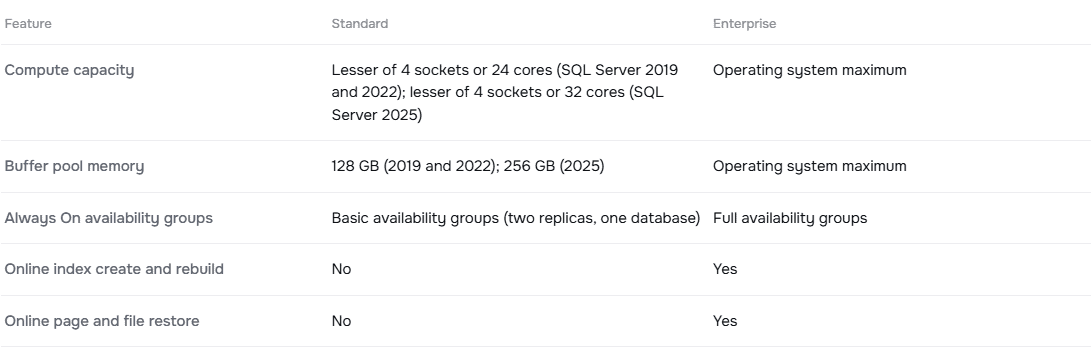
Standard or Enterprise table on the Licendeals SQL Server 2025 Standard product page: compute capacity and buffer pool memory in SQL Server 2022 and 2025

  • Compute capacity: Standard uses the lesser of 4 sockets or 24 cores in SQL Server 2022, and the lesser of 4 sockets or 32 cores in SQL Server 2025.
  • Buffer pool memory: 128 GB per instance in 2022, 256 GB in 2025.
  • Resource governor: in SQL Server 2025 it is also available in Standard, with the same functionality as in Enterprise.
  • Enterprise: the operating system maximum in both versions.

The free editions also changed. In SQL Server 2025, Express allows databases of up to 50 GB (10 GB in 2022) and includes the features of the old Express with Advanced Services. The Web edition is discontinued, and the Developer edition is now two editions: Standard Developer and Enterprise Developer, both licensed for development, not production.

Our SQL Server keys activate all cores of the server, but one Standard instance only uses up to the limit above. If you need Standard and your database is outgrowing 24 cores or 128 GB, SQL Server 2025 Standard may be enough before you look at Enterprise. Our article SQL Server Standard vs Enterprise compares the two editions in detail.

4. Support end dates

SQL Server follows Microsoft's Fixed Lifecycle Policy: about five years of mainstream support (new features and fixes) and five more of extended support (security updates). These are the dates on our product pages, from Microsoft Lifecycle:

SQL Server 2025, 2022 and 2019 mainstream and extended support end dates, as shown on Licendeals product pages

  • SQL Server 2025: mainstream support until January 6, 2031, and extended support until January 6, 2036.
  • SQL Server 2022: mainstream support until January 11, 2028, and extended support until January 11, 2033.

Dates are in US Pacific Time. A new server bought today with SQL Server 2025 gets about three more years of security updates than one with SQL Server 2022.

5. Application and operating system compatibility

Before you buy, check two things:

  • Your application: look for the supported SQL Server versions in your vendor's documentation, or ask them. Some vendors certify a new version months after its release.
  • Your server: Microsoft lists Windows Server 2019, 2022 and 2025, and Windows 10 and 11, as supported operating systems for SQL Server 2025, with .NET Framework 4.7.2. Enterprise is supported only on Windows Server, not on Windows 10 or 11.

This is the requirements table on our SQL Server 2025 Standard product page:
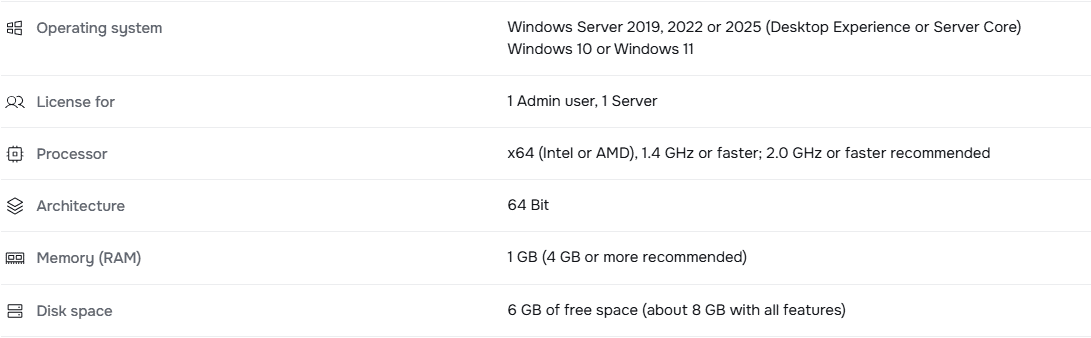
System requirements of SQL Server 2025 Standard on the Licendeals product page: Windows Server 2019, 2022 or 2025, Windows 10 or Windows 11

Both versions install with the same SQL Server Installation Center, and the product key goes on the Edition page of the setup. This screenshot is from our SQL Server 2022 guide:
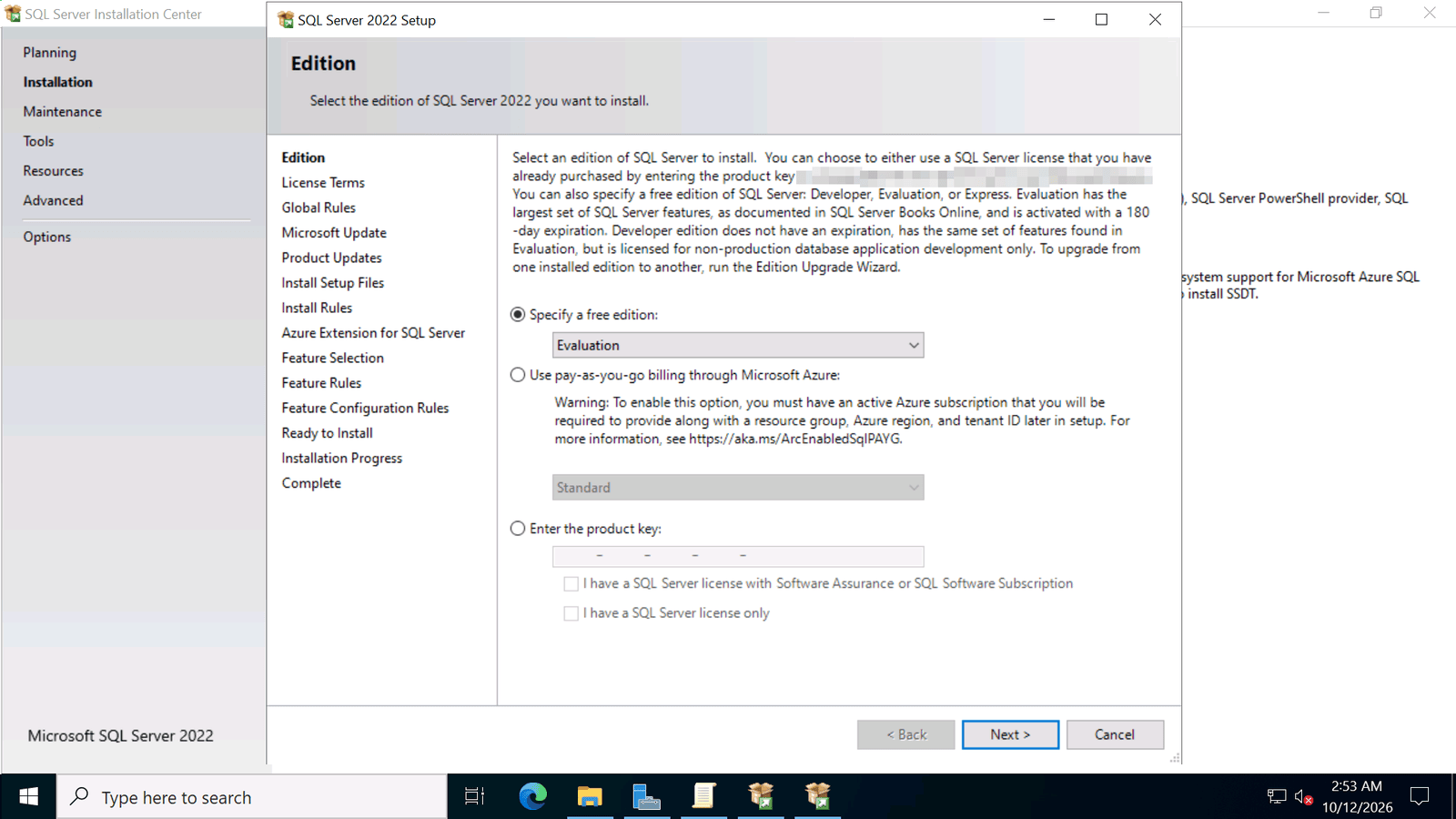
SQL Server 2022 Setup Edition page: free editions, pay-as-you-go billing or enter the product key

Our guide How to Install SQL Server 2022 and Enter Your Product Key shows every step.

6. Upgrading from 2022 to 2025

Microsoft supports an in-place upgrade from SQL Server 2022 to SQL Server 2025: Standard can be upgraded to Standard or Enterprise, and Enterprise to Enterprise. Upgrades are also supported from SQL Server 2019, 2017, and 2014 and 2016 with Service Pack 3.

  • You need a SQL Server 2025 key for the edition you upgrade to: a 2022 key does not activate 2025.
  • Microsoft recommends checking that the features you use are supported in the new edition, and the setup is blocked if a restart is pending.
  • Databases moved by backup and restore keep their compatibility level when it is 100 or higher, so your application can keep working as before.

Test the upgrade on a copy of your server first, and keep a full backup.

7. Where to buy

We sell these SQL Server versions as RETAIL Licenses for 1 server, delivered by email:

See all versions in SQL Server 2025 and SQL Server 2022.

8. Frequently asked questions

What is the difference between SQL Server 2022 and 2025?

SQL Server 2025 adds AI features such as the vector data type, a native JSON data type, regular expressions and optimized locking, raises the Standard limits to 32 cores and 256 GB, and is supported until January 6, 2036. SQL Server 2022 is supported until January 11, 2033.

Is SQL Server 2022 still supported?

Yes. Microsoft gives SQL Server 2022 mainstream support until January 11, 2028 and extended support (security updates) until January 11, 2033.

Can I upgrade SQL Server 2022 to 2025?

Yes. Microsoft supports an in-place upgrade from SQL Server 2022 to 2025. You need a SQL Server 2025 key for the edition you upgrade to.

Does a SQL Server 2022 key work with SQL Server 2025?

No. Each key activates the version and edition named on its product page.

Does SQL Server 2025 run on Windows Server 2019?

Yes. Microsoft lists Windows Server 2019, 2022 and 2025 as supported, and Windows 10 and 11 for Standard and Express.

Which version should I choose for a new server?

The one your application supports. If you have no constraint, SQL Server 2025 gives you the longest support and the higher Standard limits.

Checked on: our store and our SQL Server guides, and Microsoft's pages What's new in SQL Server 2025, What's new in SQL Server 2022, Supported version and edition upgrades (SQL Server 2025), SQL Server 2025 hardware and software requirements and Microsoft Lifecycle, read on 2026-10-27. Microsoft can change its guidance; check it if something looks different on your screen.

Still stuck? Our team can help you choose between SQL Server 2022 and 2025, with 24/7 support. Browse all SQL Server license keys at Licendeals.