November Special Offer - 5% OFF SITEWIDE!
Use code:
Valid until Nov 30
Windows, Office, Windows Server, Adobe and Autodesk. Delivered by email right away, and a real team helps you activate it, 24/7.






Every category, with how many licenses it has and where prices start.
 Windows17 licenses · from US$9.99
 Office23 licenses · from US$6.99
 Office for Mac2 licenses · from US$108.99
 Project, Visio and Outlook24 licenses · from US$7.99
 Windows Server18 licenses · from US$44.99
 SQL Server5 licenses · from US$84.00
 Visual Studio6 licenses · from US$39.99
 Volume licenses (MAK)6 licenses · from US$190.00
 Adobe2 licenses · from US$39.00
 Autodesk3 licenses · from US$24.00

A new guide every day: step-by-step fixes, how-tos and comparisons.
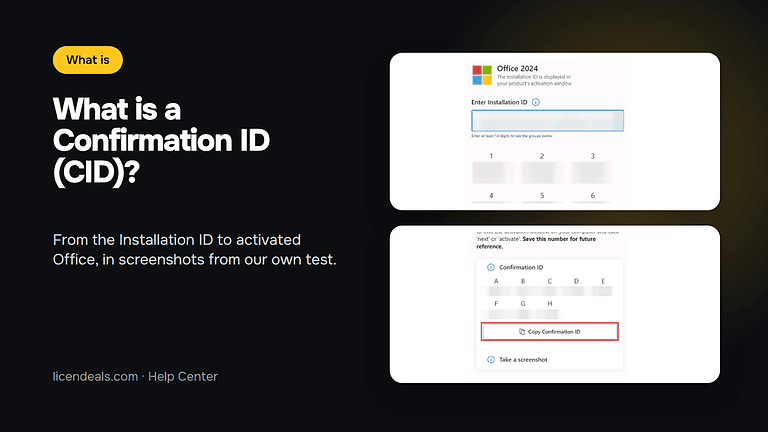
If your Confirmation ID doesn't work when you activate Office with a CID License, the cause is usually small: the wrong option in the wizard, one digit copied wrongly or a box left empty. This checklist goes through each step of the activation in order, with screenshots from our own test, so you can find where yours went wrong.
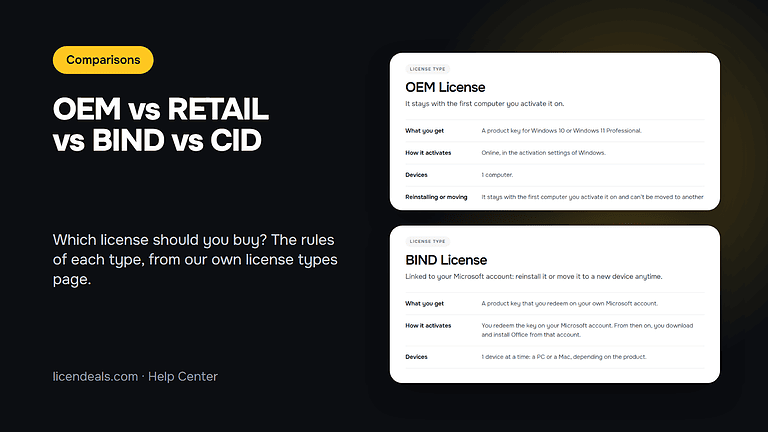
Continue readingOEM, RETAIL, BIND and CID are the four license types you will see most often on our product pages. They decide what you receive, how you activate it, what happens if you reinstall and whether you can get a refund. This guide helps you choose between them, using the rules written on our own license types page. We took the screenshots from that page on 2026-11-04.
Continue readingA Confirmation ID is the code that finishes the activation of Microsoft Office when you use a CID License. Office gives you one code, the Installation ID. You enter it on Microsoft's activation portal, and the portal gives you another code back, the Confirmation ID. You type that one into Office and the activation is done. This guide explains what each code is and how they work together, with screenshots from our own test.
Continue reading{n} from {l} bought
{n} bought
Someone from {l} bought
Someone bought
Just now
1 minute ago
2 minutes ago
1 hour ago
2 hours ago
1 day ago
2 days ago
Close



 Office for PC
 Office for Mac
 Windows Server
 SQL Server
 Office Apps
 Visual Studio
