Comparisons

SQL Server Standard vs Enterprise: Which Edition Do You Need?

SQL Server Standard vs Enterprise: which edition do you need

SQL Server Standard vs Enterprise: both editions run the same database engine, and the main differences are how much hardware one instance can use and which high-availability and online-maintenance features are included. Standard suits most small and medium businesses, and Enterprise is for workloads that need full Always On availability groups, online index operations or more compute capacity in one instance. Below we compare the two editions, show where Express and Developer stop being enough, explain how to check which edition you run and help you choose the version, with screenshots from our store and from our own test server.

IMPORTANT: the SQL Server keys in our shop are RETAIL Licenses. Each key activates the edition named on its product page, on 1 server: a Standard key does not activate Enterprise. Microsoft sets the licensing rights of each edition, so check its SQL Server licensing documents for your setup.

1. The short answer

  • Standard: Microsoft describes it as delivering "a balance of performance, security, and affordability for businesses that need enterprise-class capabilities without the complexity".
  • Enterprise: Microsoft calls it the premier offering, built for mission-critical workloads that need high service levels.

This is the table you will find on our SQL Server product pages, built from Microsoft's edition documentation:
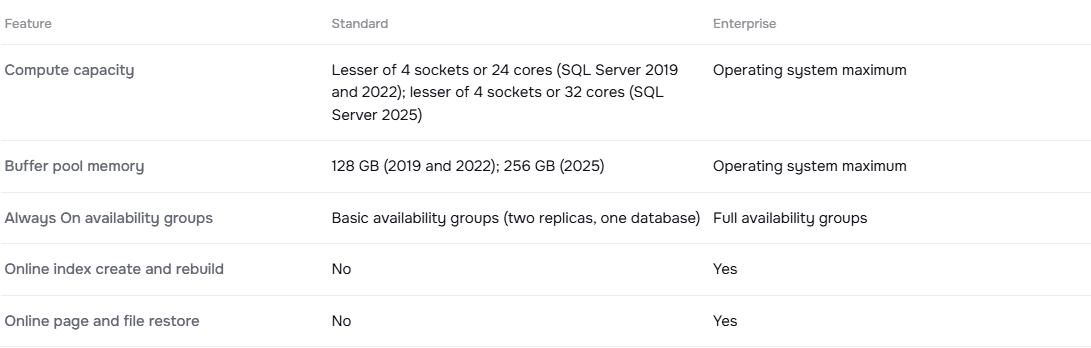
Standard or Enterprise table on the Licendeals SQL Server 2022 Standard product page: compute capacity, buffer pool memory, availability groups and online operations

If your database fits inside the Standard limits and you can live without the features marked "No", Standard is enough. If it doesn't, Enterprise is the edition to look at.

2. Limits per instance

Microsoft limits how much hardware a single instance of the Database Engine can use in Standard. Enterprise is limited only by the operating system:

  • Compute capacity: Standard uses the lesser of 4 sockets or 24 cores in SQL Server 2019 and 2022, and the lesser of 4 sockets or 32 cores in SQL Server 2025. Enterprise uses the operating system maximum.
  • Buffer pool memory: Standard is limited to 128 GB per instance in 2019 and 2022, and to 256 GB in 2025. Enterprise uses the operating system maximum.
  • Database size: the maximum relational database size is the same in both editions: 524 PB.

Our SQL Server keys activate all cores of the server, but one Standard instance only uses up to the limit above. If your server has more cores or memory than that and one instance needs them all, that is a reason to choose Enterprise. The limits are Microsoft's, so check them for your version before you buy.

3. Features that only Enterprise includes

These are the differences that matter most for production servers, according to Microsoft's feature tables for SQL Server 2022 and 2025:

  • Always On availability groups: Standard supports basic availability groups, which have two replicas and one database. Enterprise supports full availability groups, including contained and distributed availability groups.
  • Online index create and rebuild: Enterprise only.
  • Online page and file restore: Enterprise only.
  • Online schema change and fast recovery: Enterprise only.
  • Intelligent query processing: features such as batch mode adaptive joins and batch mode memory grant feedback are Enterprise only.

Standard still includes the features most businesses use every day: backup compression, encrypted backups, transparent data encryption, Always On failover cluster instances (two nodes), log shipping, SQL Server Agent, replication and the Query Store.

Microsoft's tables list many more differences, and some change between versions, so review the full table for the version you plan to buy.

4. How to tell which edition you run

You can check the edition in two ways. The first is a query in SQL Server Management Studio:

  • SELECT SERVERPROPERTY('Edition'); returns the edition of the instance, for example Standard Edition (64-bit).

The second is the discovery report of the installer. Open the SQL Server Installation Center, click Tools and then Installed SQL Server features discovery report:
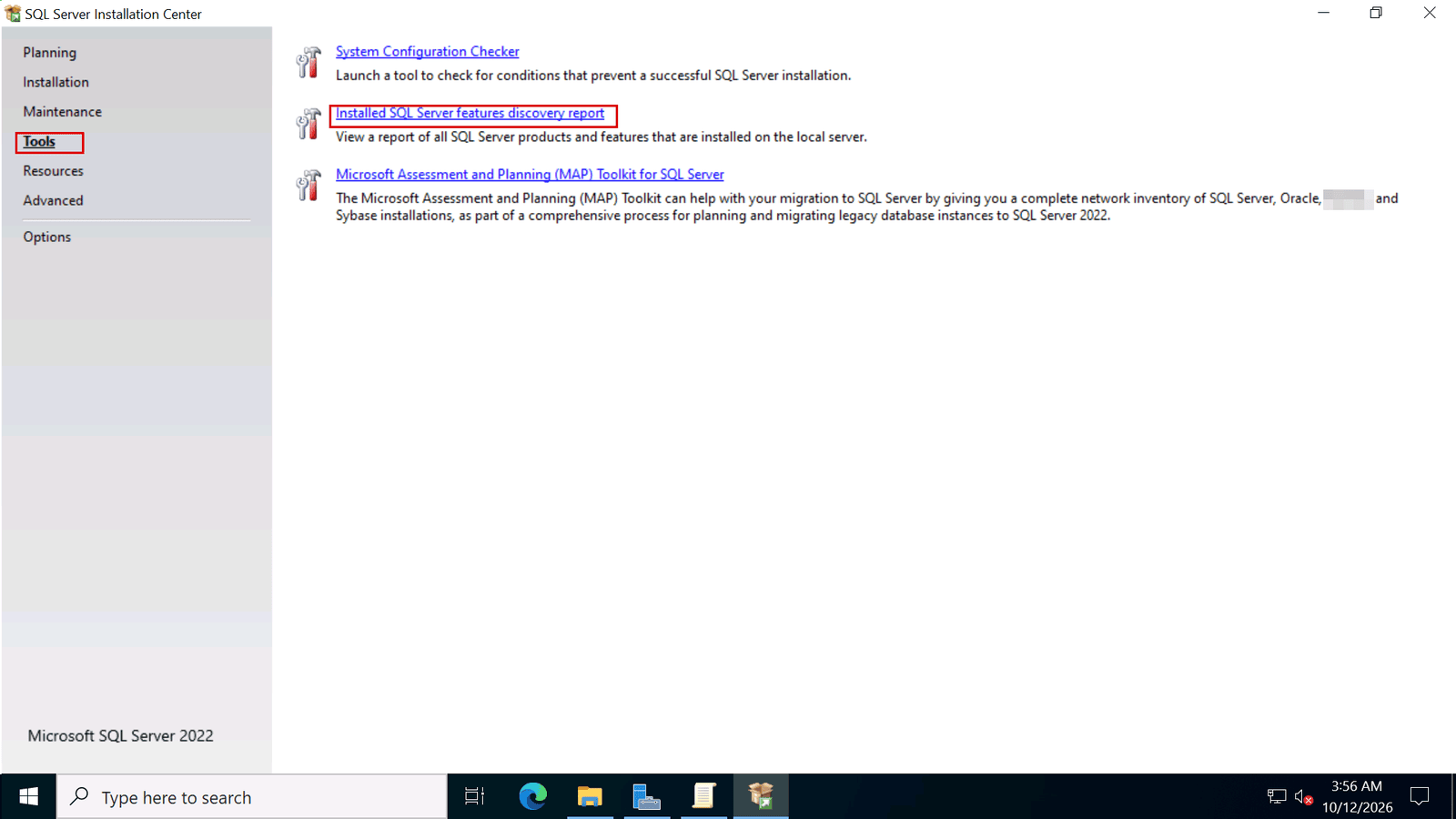
SQL Server Installation Center, Tools page, with the Installed SQL Server features discovery report link marked

The report lists every instance on the server, with its edition and version. This one, from our test server, shows Standard Edition:
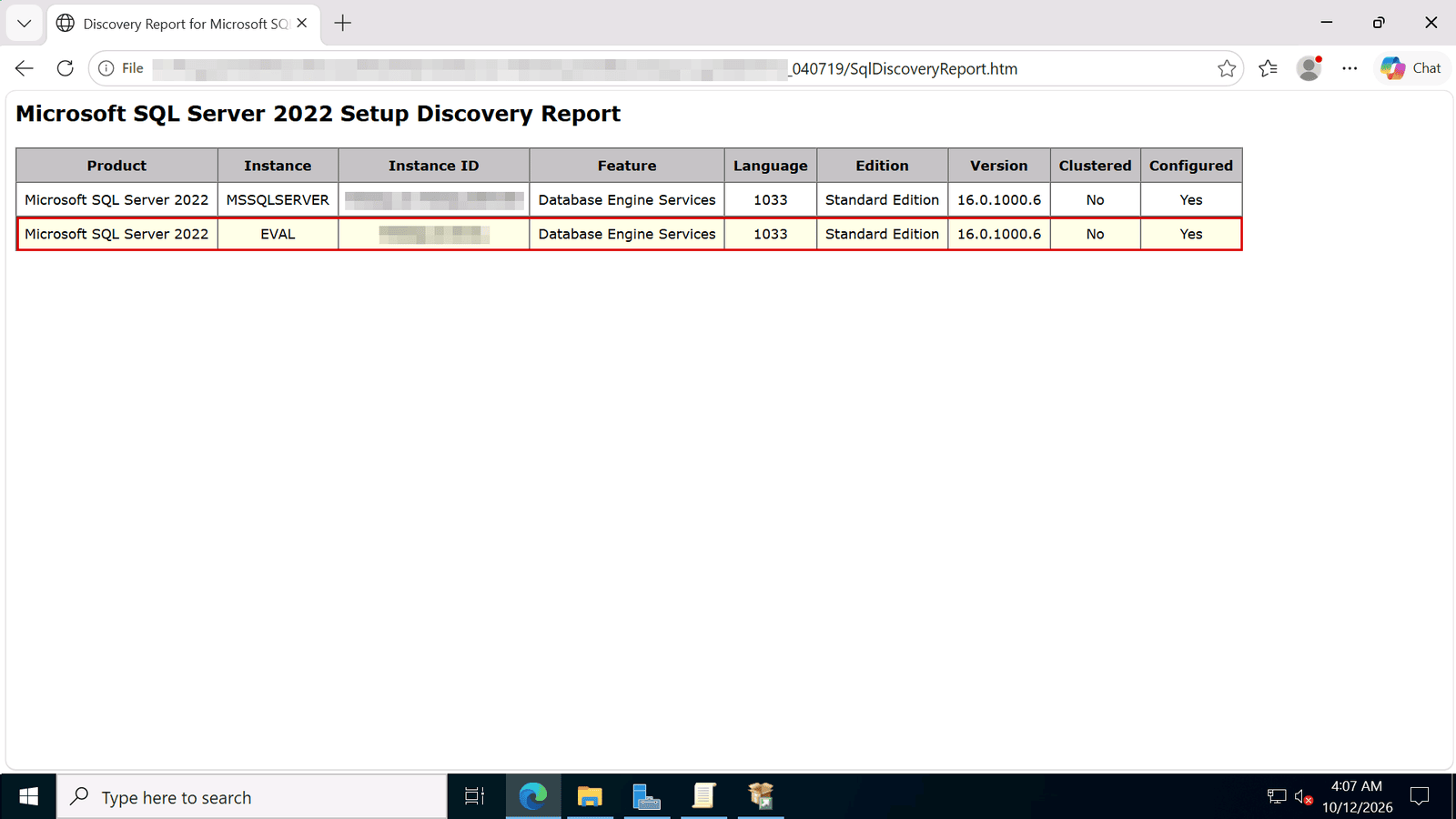
SQL Server 2022 Setup Discovery Report: the Edition column shows Standard Edition for each instance

5. Where Express and Developer stop being enough

When you install SQL Server, the Edition page offers free editions next to the product key box:
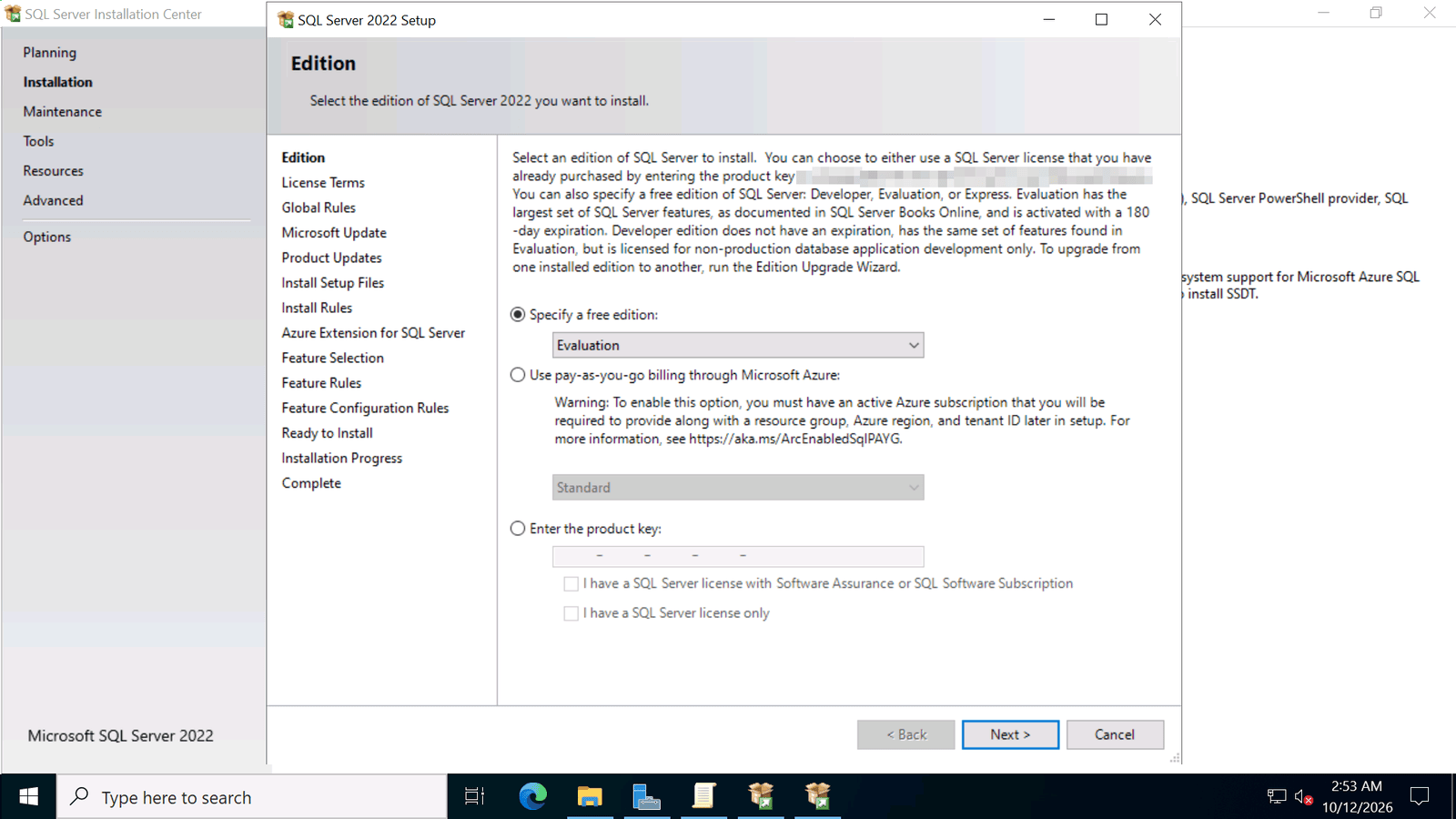
SQL Server 2022 Setup Edition page: free editions, pay-as-you-go billing or enter the product key

  • Express: Microsoft describes it as "the entry-level, free database", ideal for learning and for small desktop and server applications. In SQL Server 2022 it uses the lesser of 1 socket or 4 cores and a buffer pool of 1,410 MB, with a 10 GB database limit in the Express editions.
  • Developer: it includes all the functionality of Enterprise, but Microsoft licenses it "for use as a development and test system, not as a production server".
  • Evaluation: it includes all the functionality of Enterprise and is available for 180 days.

For a production database, you need a licensed edition: Standard or Enterprise. Our guide How to Install SQL Server 2022 and Enter Your Product Key shows the installation and where the key goes.

6. Which version: 2025, 2022 or 2019?

Choose the version your application vendor supports. If you have no constraint, the newest version gives you the longest support from Microsoft. These are the dates shown on our product pages, from Microsoft Lifecycle:

SQL Server 2025, 2022 and 2019 mainstream and extended support end dates, as shown on Licendeals product pages

  • SQL Server 2025: the newest release, with extended support until January 6, 2036.
  • SQL Server 2022: widely used and supported by many applications: extended support until January 11, 2033.
  • SQL Server 2019: a solid choice when your software is certified for it. Its mainstream support ended on February 28, 2025, and extended support runs until January 8, 2030.

Dates are in US Pacific Time. Remember that the Standard limits change with the version: 24 cores and 128 GB in 2019 and 2022, 32 cores and 256 GB in 2025.

7. Where to buy

We sell these SQL Server editions as RETAIL Licenses for 1 server, delivered by email:

8. Frequently asked questions

What is the difference between SQL Server 2022 Standard and Enterprise?

Standard uses up to the lesser of 4 sockets or 24 cores and 128 GB of buffer pool memory per instance, and supports basic availability groups. Enterprise has no limit other than the operating system and adds full availability groups, online index operations and online page and file restore.

How do I know if SQL Server is Enterprise or Standard?

Run SELECT SERVERPROPERTY('Edition'); in SQL Server Management Studio, or open the installed features discovery report from the SQL Server Installation Center.

Can I use a Standard key to activate Enterprise?

No. Each key activates the edition named on its product page. To use Enterprise, you need an Enterprise key.

Is the Developer edition free for production?

No. Microsoft licenses Developer for development and test systems, not for production servers.

Which SQL Server version should I choose?

The one your applications support. If you have no constraint, the newest version gives you the longest support: SQL Server 2025 has extended support until January 6, 2036.

Do the keys activate all cores?

Yes. Our SQL Server keys activate all cores of the server. A single Standard instance still uses only the compute capacity that Microsoft allows for that edition.

Checked on: our store and our SQL Server guides, and Microsoft's pages Editions and supported features of SQL Server 2025 and SQL Server 2022, and Microsoft Lifecycle, read on 2026-10-25. Microsoft can change its guidance; check it if something looks different on your screen.

Still stuck? Our team can help you choose between Standard and Enterprise, with 24/7 support. Browse all SQL Server license keys at Licendeals.