Reviews

Office 2024 Professional Plus LTSC Review: Is Access Worth the Extra?

Office 2024 Professional Plus LTSC review: is Access worth the extra?

We sell this product. We tested it ourselves; here is what we found, including what it doesn't do. Office 2024 Professional Plus LTSC has the same five apps as Office 2024 Standard LTSC, plus Access. We installed and activated it on our own Windows 11 test computer. Our short answer: it's worth the extra only if you create or change Access databases. If you don't, Standard already gives you the other five apps.

TESTED ON: Windows 11 (our test computer), October 2026. Microsoft Office LTSC Professional Plus 2024, Version 2408 (Build 17932.21000 Click-to-Run), activated online with a MAK key. We didn't activate a CID License for this review. We confirmed that Access is part of the installed product, but we didn't build a database or try Access's features for this review.

1. What Office 2024 Professional Plus LTSC is

Office LTSC 2024 is the one-time purchase edition of Office that Microsoft makes for organizations. LTSC stands for Long Term Servicing Channel: Microsoft describes it as an edition for environments that can't take feature updates. You pay once, there is no subscription and it doesn't expire.

Microsoft makes two editions for Windows: Standard and Professional Plus. Among the Office LTSC 2024 editions, only Professional Plus includes Access. We already reviewed the other edition in our Office 2024 Standard LTSC review, so this review focuses on what changes.

2. What you get: the apps

2.1 While it installs, the Microsoft installer shows the icons of Word, Excel, PowerPoint, Outlook, OneNote and Access, and also a Skype icon. Microsoft says Skype for Business is an optional install during setup. We didn't test it, and it isn't one of the six apps we list for this product.
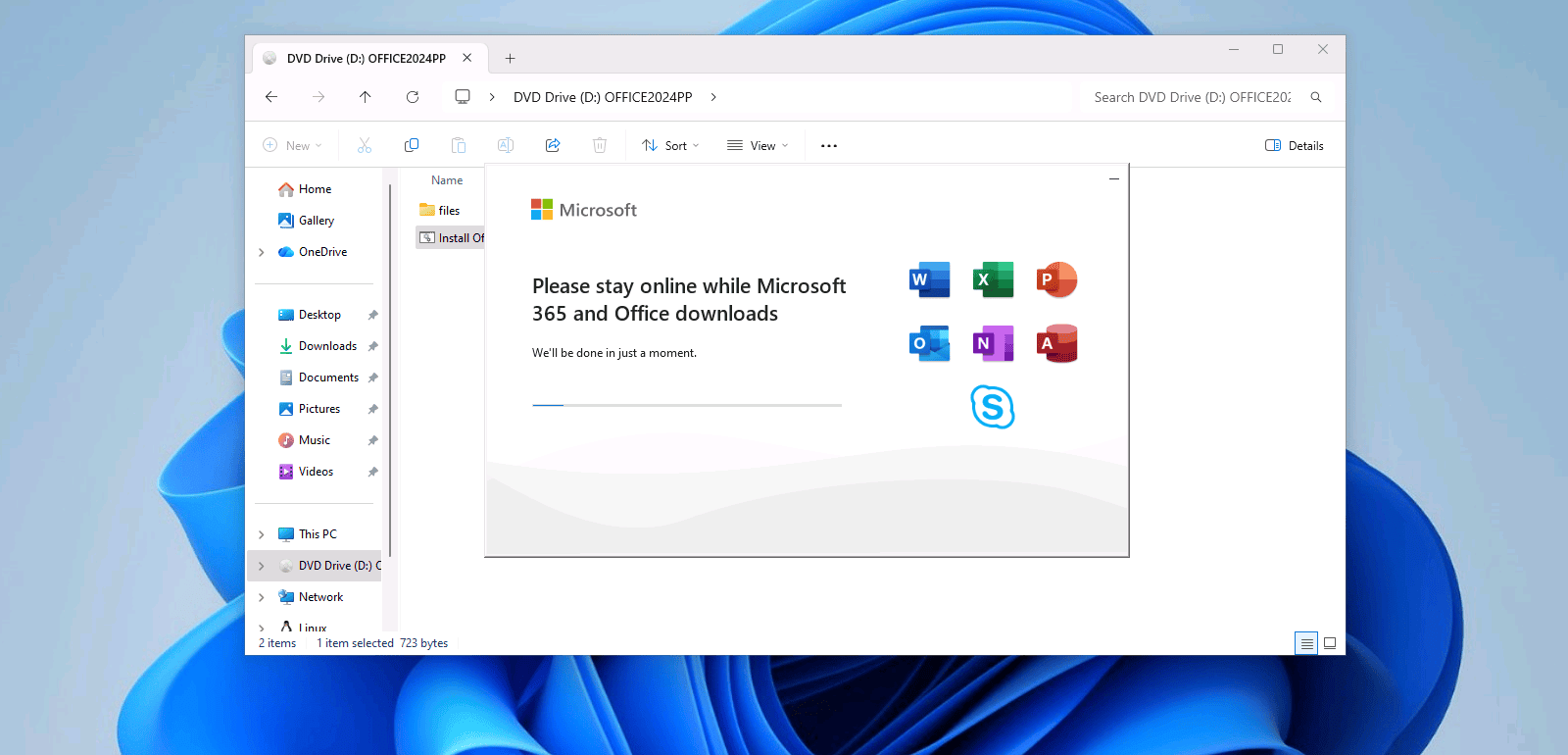
Office 2024 Professional Plus LTSC installer downloading, with the icons of Word, Excel, PowerPoint, Outlook, OneNote, Access and Skype

2.2 In Word, File, Account shows the product name, Microsoft Office LTSC Professional Plus 2024, and six app icons under "This product contains". We took this screenshot before activating it, which is why it says "Activation Required".
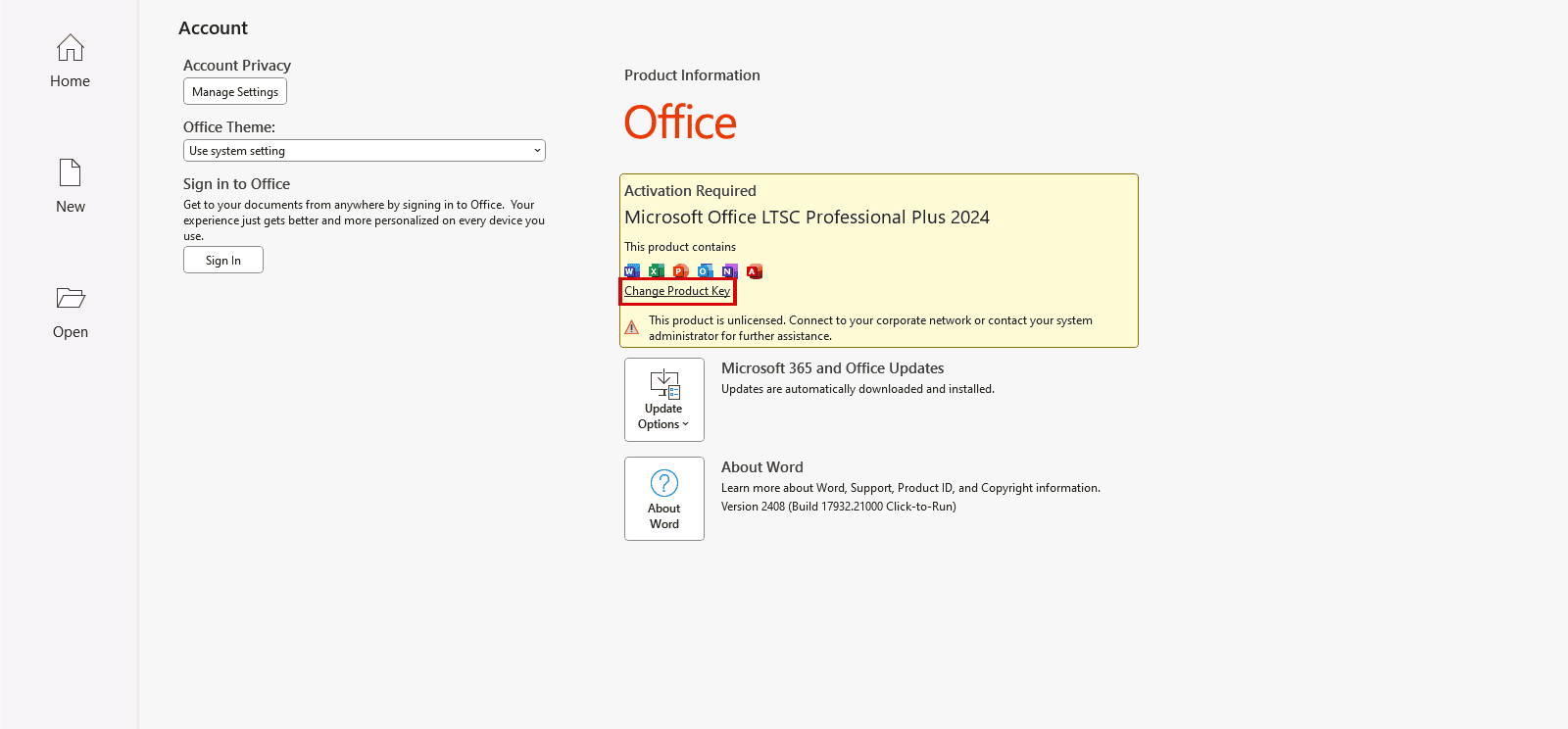
Word, File, Account: Microsoft Office LTSC Professional Plus 2024 and the six apps it contains, before activation

2.3 After the installation, Word, Excel, PowerPoint and OneNote were pinned to the Start menu of our test computer. Access and Outlook weren't, so look for them under All.
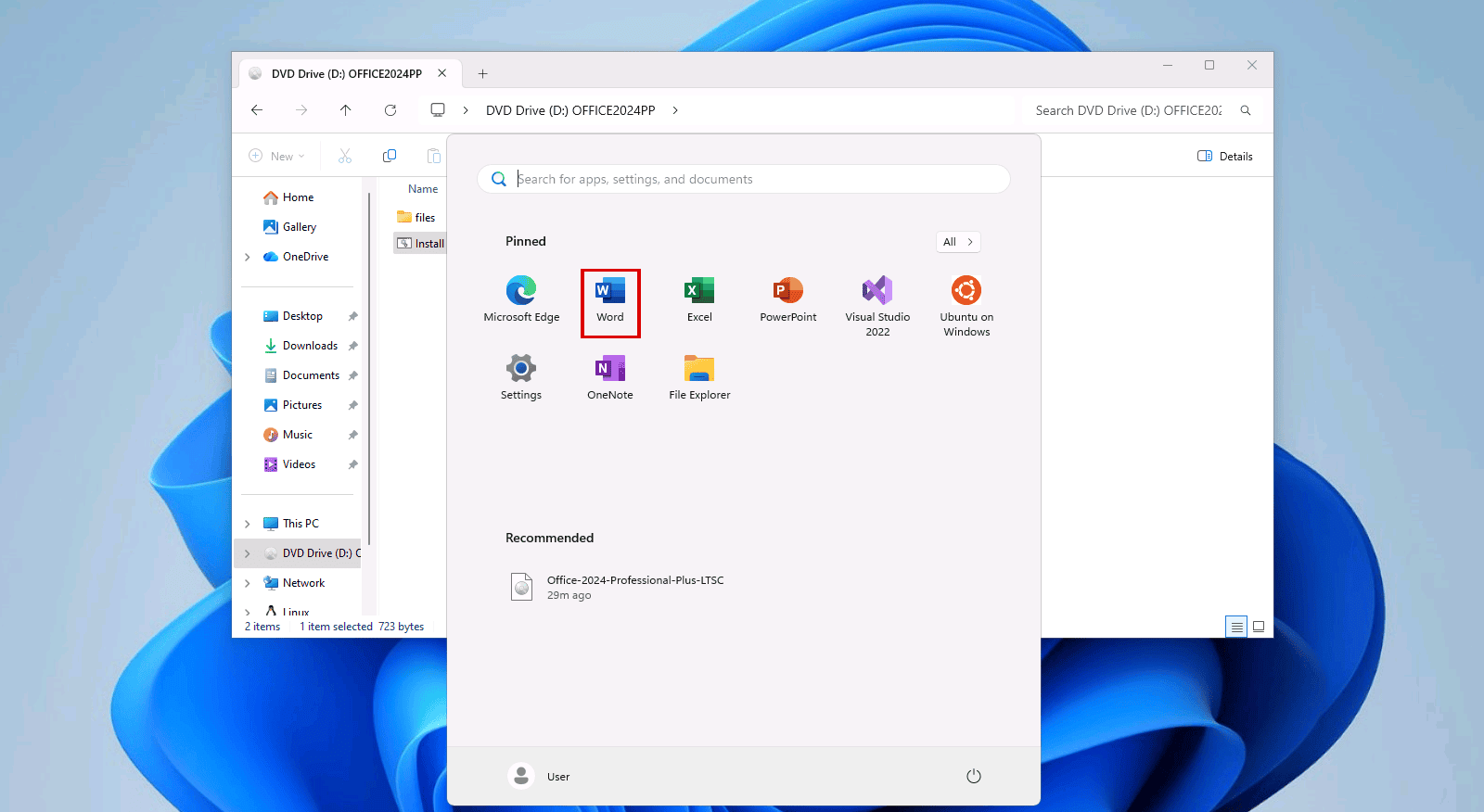
Windows 11 Start menu after the installation: Word, Excel, PowerPoint and OneNote pinned, Access and Outlook not pinned

3. What Access adds

The difference between the two editions is easy to see on our own product pages. This is Professional Plus:

What's included on the Licendeals page for Office 2024 Professional Plus LTSC: six app icons, including Access, and CID as the license type

And this is Standard, with the same five apps and no Access:

What's included on the Licendeals page for Office 2024 Standard LTSC: five app icons, without Access, and CID as the license type

Access is Microsoft's database app: you use it to build databases and simple business apps. Microsoft's page on what's new in Access 2024 lists, among other things:

  • Modern charts, with 10 new chart types.
  • An updated Monaco SQL editor, with syntax highlighting and line numbering.
  • A Microsoft Edge browser control, to show web pages on a form.

This list comes from Microsoft and we haven't tested these features. Microsoft says the features on that page are included in Access LTSC 2024 unless it notes otherwise, and it mentions the Microsoft 365 Current Channel for the charts and the SQL editor. If one of them matters to you, check that page first.

4. Is Access worth the extra?

  • Yes, if you create or change Access databases: tables, forms, queries or reports. That is the reason to choose Professional Plus.
  • No, if you only need Word, Excel, PowerPoint, Outlook and OneNote. Choose Office 2024 Standard LTSC.
  • Maybe not, if you only run a database that someone else built. Microsoft offers a free Access Runtime for that, with its design tools removed or disabled. We haven't tested it, so ask whoever built your database whether it works with the Runtime.
  • Maybe not, if Access is the only app you need and you want to be able to reinstall it. We also sell Access 2024 on its own, as a BIND License linked to your Microsoft account. It isn't necessarily cheaper and it can't be refunded unless the law of your country requires it, so compare both product pages first.
  • No, if you use a Mac. Microsoft says Access isn't available for devices running macOS.

We don't compare prices here because they can change: the product pages show the current ones.

5. What it doesn't do: the downsides

  • No Publisher. Microsoft doesn't include Publisher in Office LTSC 2024, because Publisher is no longer supported after October 2026.
  • No new features. Office LTSC 2024 doesn't receive feature updates after launch. New features only reach Microsoft 365 Apps, the subscription version.
  • No cloud-backed features. Microsoft says Office LTSC 2024 doesn't include the latest cloud-backed features of Microsoft 365 Apps, such as real-time collaboration or AI-driven automation.
  • Teams is not preinstalled. You can download Microsoft Teams separately from Microsoft.
  • Support ends on October 9, 2029. Microsoft gives Office LTSC 2024 five years of Mainstream Support and no Extended Support after that.
  • Each activation can be used only once. See section 7 for what that means with each license type.
  • Check your Windows version. Microsoft lists Windows 11, Windows 11 LTSC 2024, Windows 10 LTSC 2021 and 2019, and Windows Server 2025 and 2022 as supported. If your computer runs another Windows 10 edition, check Microsoft's system requirements first.

6. Installation and activation in our test

6.1 Installation. Our download is an .iso file. Double-clicking it opens it as a DVD drive, and the install file starts the Microsoft installer, which downloads Office from Microsoft's servers: keep the computer online until it finishes. Microsoft says to uninstall earlier versions of Office first.

6.2 Activation. You enter the key in Word, with File, Account, Change Product Key. On our test computer we used a MAK key, and this is the result:
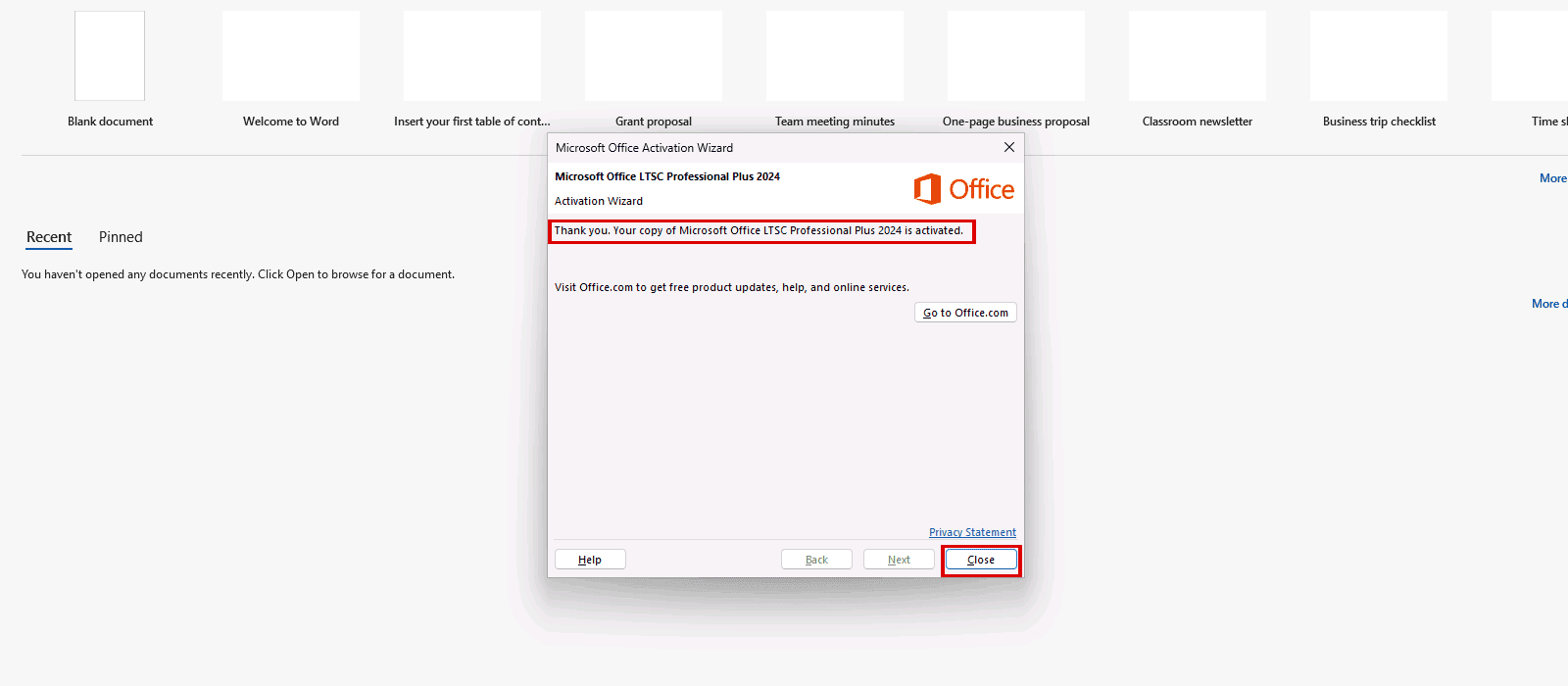
Office Activation Wizard: Thank you. Your copy of Microsoft Office LTSC Professional Plus 2024 is activated

The full steps, with all the screenshots, are in our guides: Office 2024 Professional Plus LTSC via CID and Office 2024 Professional Plus LTSC (MAK).

7. CID License or MAK Volume License

We sell this edition with two license types. The apps are the same, and the rules below are the rules of our store, not Microsoft's:

  • CID License: for 1 PC. It activates with a Confirmation ID through Microsoft's activation portal: you enter the key in Office and then get a Confirmation ID online. Reinstalling or changing hardware uses up that activation, and our warranty doesn't cover it.
  • MAK Volume License: a volume key for businesses. One key activates every device you order, with one activation per device. We recommend having an IT professional activate it. Each activation can be used only once, so activating again after reinstalling or changing hardware uses another of the activations you bought, and our warranty doesn't cover it. It doesn't include access to Microsoft's Volume Licensing Service Center (VLSC).

Our license types page explains each one, and our guide to MAK Volume Licenses goes into more detail.

8. Frequently asked questions

What is the difference between Office 2024 Professional Plus LTSC and Standard LTSC?

The apps: Professional Plus includes Access, and Standard doesn't. Word, Excel, PowerPoint, Outlook and OneNote are in both.

Does Office 2024 Professional Plus LTSC include Publisher?

No. Microsoft doesn't include Publisher in Office LTSC 2024.

Does it work on a Mac?

No. Our Office 2024 Professional Plus LTSC is for Windows, and Microsoft says Access isn't available for devices running macOS.

Is it a subscription?

No. It is a one-time purchase and it doesn't expire. Microsoft supports Office LTSC 2024 until October 9, 2029, and it doesn't receive new features.

Can I reinstall it?

Not with the same activation. With a CID License or a MAK Volume License, each activation can be used only once. Section 7 explains what happens with each one.

What if my license doesn't work?

If a license doesn't work, tell us within 24 hours of revealing it and we will replace it right away. MAK Volume Licenses have 30 days instead of 24 hours. Your statutory rights are not affected.

Checked on: our test computer (Windows 11, October 2026), our product pages and license types page, and Microsoft pages, read on 2026-11-02. Sources: Overview of Office LTSC 2024, Office LTSC 2024 lifecycle, What's new in Access 2024 and Download and install Microsoft 365 Access Runtime. We don't give stars or scores. Microsoft can change these pages; check them if something looks different on your screen. If you spot a mistake in this review, tell us and we will correct it.

Need Access? Get your Office 2024 Professional Plus LTSC key at Licendeals, with 24/7 support.